Universal External Rechargeable Battery - BP75. High capacity: This battery capacity is 73 Watt-hour ( or 20000 mAh if we rate this battery capacity like some other brand external batteries on market). We suggest using "Watt-hour" instead of "Amp-hour" to compare capacities of different batteries. Watt-hour or Wh, is a more accurate unit to show the power capacity than Amp-. Hour (Ah) that was used before. The Watt-Hour unit means the wattage that the battery can provide within one hour. This Universal External Lithium Rechargeable Battery Pack can provide power for laptop computers, digital cameras, digital photo frames, PDAs, cell phones, DVD players.
Note: We recommend you order the complete battery kit with AC charger and 10 connectors if this is the first time you order this battery. This battery can use same AC charger and connectors as our BP150, BP160 and BP170 batteries. If you already have the AC charger and connectors for those batteries, you can just order the bare battery without AC charger and connectors. Otherwise, please order the battery with optional AC charger and connectors so you can use the battery immediately. Order AC charger and connectors separately may cost more.
Features:
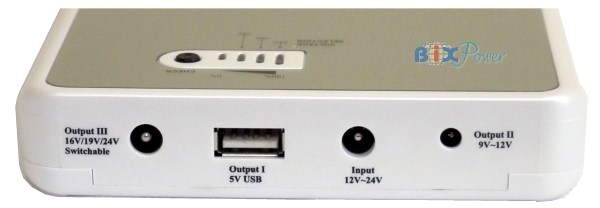
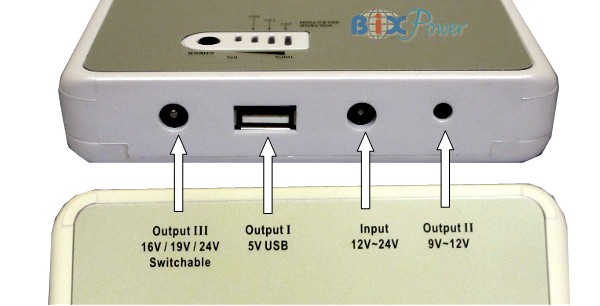
1.This battery has 3 output ports:
Output I is a 5V USB port which can be used to power or charge cell phones, iPhone/iPod/iTouch, MP3/MP4 players, PDAs and any device that can be charged from a USB port.
Port II output nominal voltage is 11.1V (Range from 9V ~ 12.6V). This port power is directly from battery cells without voltage regulation. When the battery is fully charged, its voltage is 12.6V, then output voltage will decrease gradually. Most of the time, the output voltage will be around 10V ~ 11V ( nominal voltage is 11.1V). When the voltage drops to 9V, the port will shut off and stop providing power. This port can be used to power portable DVD players and digital photo frames.
Port III can output 3 different regulated stable voltages: 16V, 19V, 24V. This port can be used to power many different laptop notebook computers and other electronic devices that require stable voltage.
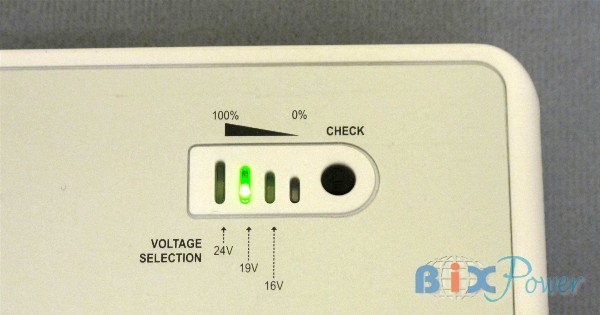
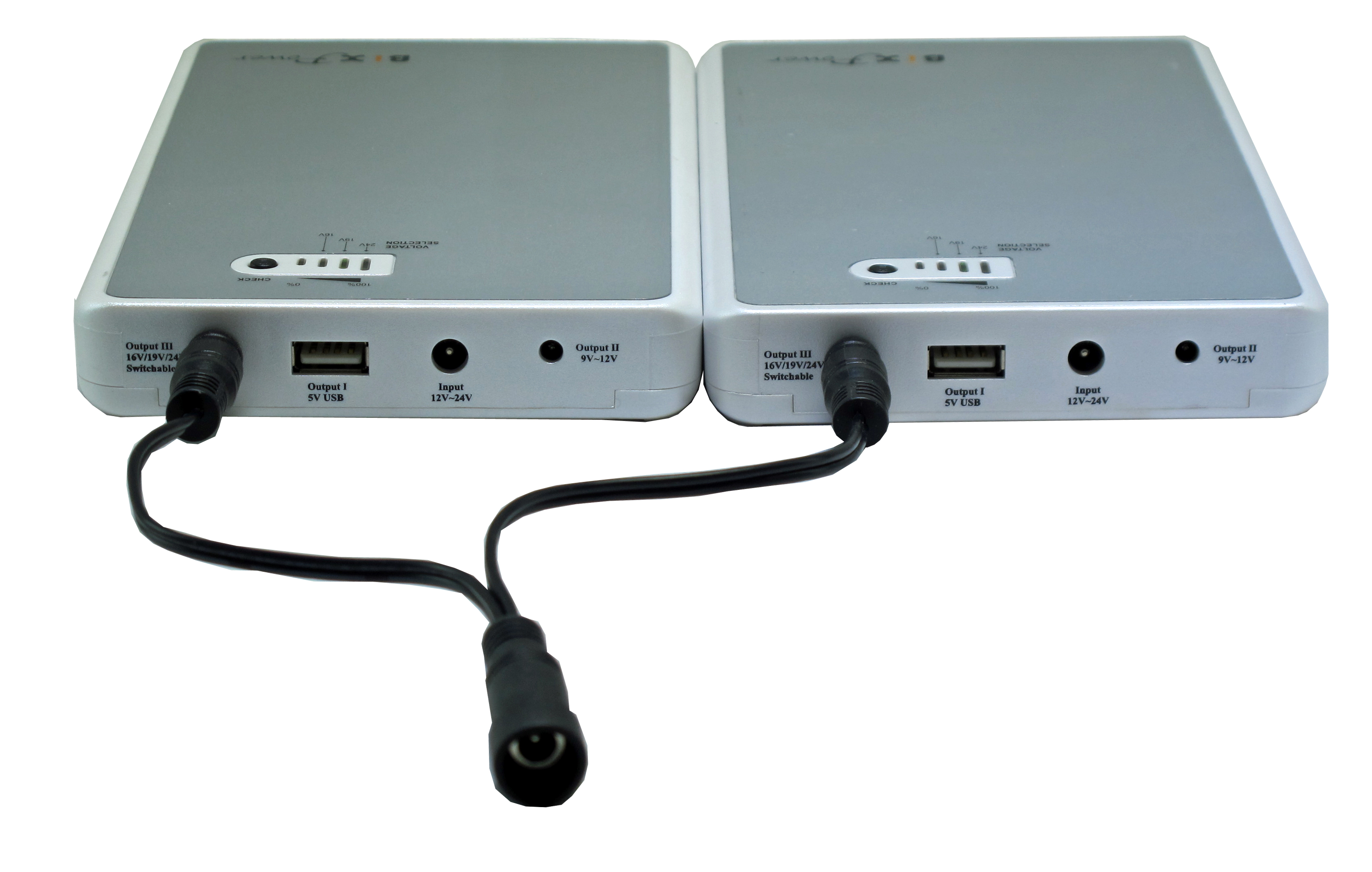
There are 3 led lights to indicate output voltages. When you plug the output cord to the port III, one LED will light to show you current active output voltage.
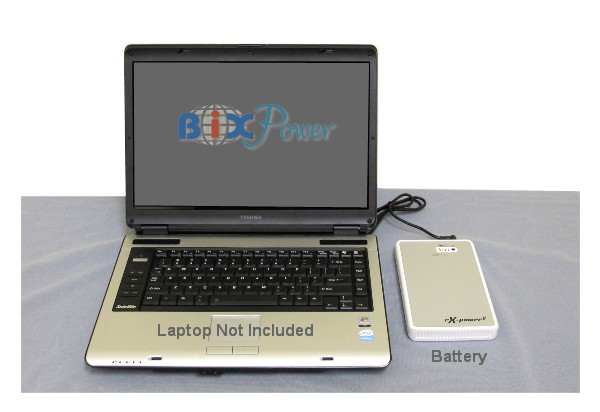
Laptop computer not included.
With optional different connector tips, this battery can be used to power or charge many different laptop computers.
2. High Capacity and Long Running Time:
This battery capacity is equivalent to a 9-cell lithium-ion battery. In most case, it can double your laptop running time together with your internal laptop battery. For some small netbook computers, it may even triple the running time.
Typical run time for iPhone:
Talk Time: Up to 60 hours
Internet Use: Up to 60 hours
Audio Playback: Up to 300 hours
Video Playback: Up to 85 hours
3. Wide range input voltage:
This battery can be charged from 12V to 24V DC power. It may use your current laptop AC power adapter as a charger if it has a 5.5x2.1mm connector. In this case, there is no need to carry an extra charger when you travel. If your current laptop AC power adapter connector is not 5.5x2.1mm connector, you may find a converter from us from our site at: 5.5 x 2.1mm Connector Converters.
Specifications:
It has 6600mAh/11.1V, 73Watt-Hour capacity.
Its universal platform works for most of the notebook computers which require 15V~20V DC input voltage. (This voltage is notebook AC power adapter output voltage, not the internal battery voltage.)
Built-in USB Power Port for Charging or Powering PDA's, Cell Phones, Media Players, or Anything that can be Charged from it's USB Cable
Its compact size can easily fit into a laptop/notebook carry bag.
Will provide up to 2 ~ 4 Hours of Power depending on Laptop and Usage. Fully Recharges with OEM or Equivalent Laptop AC Power Supply in about 2.5 Hours
5V, 16V, 19V DC output - 6600mAh Lithium Ion (73Wh)
Maximum Output: 65W
Capacity: 73 Wh
Weighs only 1.4 Lbs. Compact size 6.5 x 4.5 x 1 inches
Excellent security and reliability
High efficiency power conversion
No Memory effect
How to use the battery:
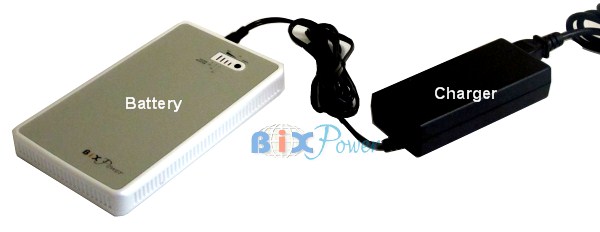
<1>Charge the battery: This battery can be charged from 100V ~ 240V 50Hz/60Hz AC power source with the battery AC charger:
You can also charge the battery from car cigarette lighter socket with the optional car charger, or charge the battery from sun with the optional solar panel.
<2> Decide Battery Output Voltage:
The battery output voltage should close to your laptop power adapter output voltage or laptop computer input voltage
|
|
|
|
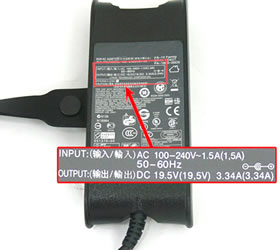
Step 2a:
Refer to the label on AC adapter for your notebook - to check the "Output" power.
|
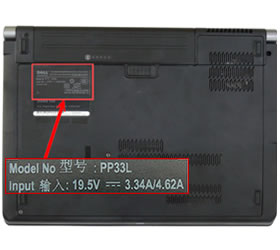
Step 2b:
Refer to the label stuck on the bottom of your notebook - to check the "power input" requirement.
|
The battery Port III can output 3 different regulated voltages: 16V, 19V, 24V. This port can be used to power laptop notebook computers with the output cable and different connector tips. Please set the port III output voltage close to your laptop power adapter output voltage or laptop itself input voltage.
There are 3 LED lights to indicate port III output voltages. When you plug the output cord to the port III, one LED will light to show you current active output voltage.
If you want to change, just:
1. Press and hold the "CHECK" button for about 3 seconds.
2. One of the LED indicator will begin flashing.
3. Press and release the "CHECK" button, the flashing LED will jumper to different voltage. When it jumps to the voltage you want, stop press the "CHECK" botton
Wait about 5 seconds, the flashing LED will be gone and the voltage selection has been confirmed. for laptop computers.
<3>According to output voltage, select Output Port and Connector Tip:
Port I: 5V USB power output with output cable Z4
Port II: 9V ~ 12V DC output port with output cable Z5.
Port III: 16V ~ 24V DC output port with Output Cable Z6.
Optional Connector Tips for Port III:
Optional 10 Popular Connector Tips for Port III
Port I an Port II can use optional connector tips at Consumer Electronics Plug Tips.
Port III can use our optional C Series Connector from CNT-C1 to CNT-C30.
Polarity
The default battery output cable and connectors are configured as positive polarity, which meet the needs of most of devices.
Standard package:
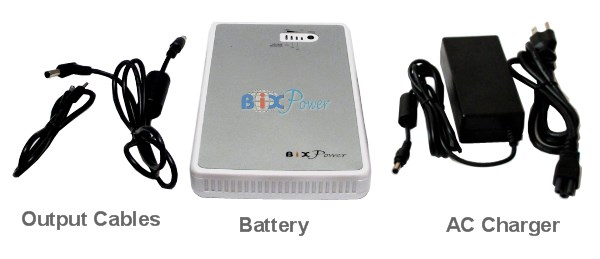
The battery pack comes with one BP75 battery + 3 output cables AC charger is optional.
* Battery AC Charger is optional, we suggest you order the battery with AC charger if you have not ordered any similar AC charger from us before.
3 output cables are for 3 different output ports:
Port I Output Cable: 5V USB power output cable Z4
Port II Output Cable: 9V ~ 12V DC output port output cable Z5.
Port III Output Cable: 16V ~ 24V DC output port output cable Z6.
Optional connector Tips:
1. Port I an Port II can use optional connector tips at Consumer Electronics Plug Tips.
2. Port III can use our optional C Series Connectors from CNT-C1 to CNT-C30. We also offer a Connector Kit with 10 most popular connectors.
Compatibility
The following are compatible laptop models this battery works for. It is just a partial list; this battery can work for more models. All must have a 60w-70w AC power adapter with an 15v-20v output. If your laptop AC power adapter has more than 70W output power(such as 90W for some models), you may not use this battery as an external battery, but you can use it to charge your internal battery while your laptop computer is turned off.
Acer:: works for Acer Laptop that has a 60W ~70W AC power adapter with 18V~20V DC output, such as:
Acer Aspire One Series
Acer aspire one ZG5
Acer Aspire One A110L
Acer Aspire One A150L
Acer Aspire One A150X
Acer Aspire One AoA110-1295
Acer Aspire One AoA110-1722
Acer Aspire One AoA150-1006
Aspire 1300, 3002, 3002LCi, 3002WLCi, 3003, 3003LCi, 3003WLCi, 3004, 3005, 3009, 3050, 3100, 3502WLCi, 3623, 3624,
Aspire 5002, 5003, 5004, 5005, 5100, 5102, 5601, 5672, 9400, 9402
Acer Extensa 355, 365, 366D, 367D, 368D, 390, 390C, 390CX, 393,
Acer Extensa 500, 501DX, 501T, 502D, 502DX, 502T, 503DX, 503T, 505DX, 506DX, 515,
Acer Extensa 600, 610, 610CD, 610CDT, 650, 900, ESS3-391T
AcerNote 350, 355, 356, 367D, 367T, 370C, 374, 390, 390A, 391, 392, 393, 394, 395, 850C
AcerNote Light 350, 350C, 352, 355, 356, 358, 359, 360, 361, 363, 370, 370C, 370P, 370PC, 372, 373, 373+, 380, 381, 383, P100
Acer Anywhere 1100LX, 1120LX
Acer TravelMate 200, 200DX, 200T, 201T, 202T, 240, 244LCi, 244LC-XPP, 2480, 250, 250PE, 252ELC, 252ELCi, 254ELCi,
Acer TravelMate 505DX, 506T, 507DX, 507T, 512DX, 512T, 524TX, 524TXV, 735TLV, 735TXV
Asus: works for the Laptop that has a 60W ~70W AC power adapter with 18V~20V DC output. If your laptop AC power adapter has more than 70W output power(such as 90W for some models), you may not use this external battery as normal, but you still can use this external battery to charge your internal battery when your laptop notebook computer is turned off.
Compaq:: works for Laptop that has a 60W ~70W AC power adapter with 15V~20V DC output. If your laptop AC power adapter has more than 70W output power(such as 90W for some models), you may not use this external battery as normal, but you still can use this external battery to charge your internal battery when your laptop notebook computer is turned off.
Dell:: works for Laptop that has a 60W ~70W AC power adapter with 18V~20V DC output. If your laptop AC power adapter has more than 70W output power(such as 90W for some models), you may not use this external battery as normal, but you still can use this external battery to charge your internal battery when your laptop notebook computer is turned off.
E-Machine:: works for Laptop that has a 60W ~70W AC power adapter with 15V~20V DC output. If your laptop AC power adapter has more than 70W output power(such as 90W for some models), you may not use this external battery as normal, but you still can use this external battery to charge your internal battery when your laptop notebook computer is turned off.
Fujitsu:: works for Laptop that has a 60W ~70W AC power adapter with 15V~20V DC output. If your laptop AC power adapter has more than 70W output power(such as 90W for some models), you may not use this external battery as normal, but you still can use this external battery to charge your internal battery when your laptop notebook computer is turned off.
Gateway:: works for Laptop that has a 60W ~70W AC power adapter with 15V~20V DC output. If your laptop AC power adapter has more than 70W output power(such as 90W for some models), you may not use this external battery as normal, but you still can use this external battery to charge your internal battery when your laptop notebook computer is turned off.
HP:: works for Laptop that has a 60W ~70W AC power adapter with 15V~20V DC output. If your laptop AC power adapter has more than 70W output power(such as 90W for some models), you may not use this external battery as normal, but you still can use this external battery to charge your internal battery when your laptop notebook computer is turned off.
IBM/Lenovo:: works for Laptop that has a 60W ~70W AC power adapter with 15V~20V DC output. If your laptop AC power adapter has more than 70W output power(such as 90W for some models), you may not use this external battery as normal, but you still can use this external battery to charge your internal battery when your laptop notebook computer is turned off.
Panasonic:: works for Laptop that has a 60W ~70W AC power adapter with 15V~20V DC output. If your laptop AC power adapter has more than 70W output power(such as 90W for some models), you may not use this external battery as normal, but you still can use this external battery to charge your internal battery when your laptop notebook computer is turned off.
Sony:: works for Laptop that has a 60W ~70W AC power adapter with 15V~20V DC output. If your laptop AC power adapter has more than 70W output power(such as 90W for some models), you may not use this external battery as normal, but you still can use this external battery to charge your internal battery when your laptop notebook computer is turned off.
Toshiba:: works for Laptop that has a 60W ~70W AC power adapter with 15V~20V DC output. If your laptop AC power adapter has more than 70W output power(such as 90W for some models), you may not use this external battery as normal, but you still can use this external battery to charge your internal battery when your laptop notebook computer is turned off.
Standard package:
The battery pack comes with one BP75 battery + 3 output cables. AC charger is optional.
* Battery AC Charger is optional, we suggest you order the battery with AC charger if you have not ordered any similar AC charger from us before.
3 output cables are for 3 different output ports:
Port I Output Cable: 5V USB power output cable Z4
Port II Output Cable: 9V ~ 12V DC output port output cable Z5.
Port III Output Cable: 16V ~ 24V DC output port output cable Z6.
Optional Connector Tips:
Optional 10 Popular Connector Tips for Port III
Port I an Port II can use optional connector tips at Consumer Electronics Plug Tips.
Port III can use our optional C Series Connector from CNT-C1 to CNT-C30.
Overall Rating for Universal External Rechargeable Lithium-Ion Battery - BP75
Technical Specifications
| Model: |
BP75 |
| Capacity: |
73 Watt-Hour |
| Battery Cell: |
Lithium-ion |
| Colors: |
Silver
|
| Acceptable Input Charging Voltage: |
DC 12 - 24V |
| Output Ports: |
3 Output Ports |
| Output Voltages: |
Port I: 5V USB Port
Port II: Non-regulated, Nominal votage 11.1V, Range 9V ~ 12.8V
Port III: Regulated 16V, 19V or 24V selectable
|
| Operation Current: |
Port II & Port III Max. 3A ~ 3.5A
Port I USB Port Max. 1A
|
| Charging time: |
4-6 hours |
| Size: |
168 x 114 x 22.5mm ( or 6.5" x 4.5" x 0.9")
|
| Weight: |
621g |
| Power Indicator: |
4 level LED indicator |
| Built-in Protection Circuit: |
- Over-charge
- Over-discharge
- Over current
- Over temperature
- Short circuit protection |
| Included in Standard Package: |
- Battery x 1 pc
-Port I Power Cable x 1pc
-Port II Power Cable x 1 pc
-Port III Power Cable x 1 pcs
-Other Optional Parts.
|
How to use the battery:
<1>Charge the battery: This battery can be charged from 100V ~ 240V 50Hz/60Hz AC power source with the battery AC charger:
<2> Decide Battery Output Voltage:
The battery output voltage should close to your laptop power adapter output voltage or laptop computer input voltage
|
|
|
|
Step 2a:
Refer to the label on AC adapter for your notebook - to check the "Output" power.
|
Step 2b:
Refer to the label stuck on the bottom of your notebook - to check the "power input" requirement.
|
The battery Port III can output 3 different regulated voltages: 16V, 19V, 24V. This port can be used to power laptop notebook computers with the output cable and different connector tips. Please set the port III output voltage close to your laptop power adapter output voltage or laptop itself input voltage.
There are 3 LED lights to indicate port III output voltages. When you plug the output cord to the port III, one LED will light to show you current active output voltage.
If you want to change, just:
1. Press and hold the "CHECK" button for about 3 seconds.
2. One of the LED indicator will begin flashing.
3. Press and release the "CHECK" button, the flashing LED will jumper to different voltage. When it jumps to the voltage you want, stop press the "CHECK" botton
Wait about 5 seconds, the flashing LED will be gone and the voltage selection has been confirmed. for laptop computers.
<3>According to output voltage, select Output Port and Connector Tip:
Port I: 5V USB power output with output cable Z4
Port II: 9V ~ 12V DC output port with output cable Z5.
Port III: 16V ~ 24V DC output port with Output Cable Z6. and different connectors.
Optional AC Charger and Connector Tips:
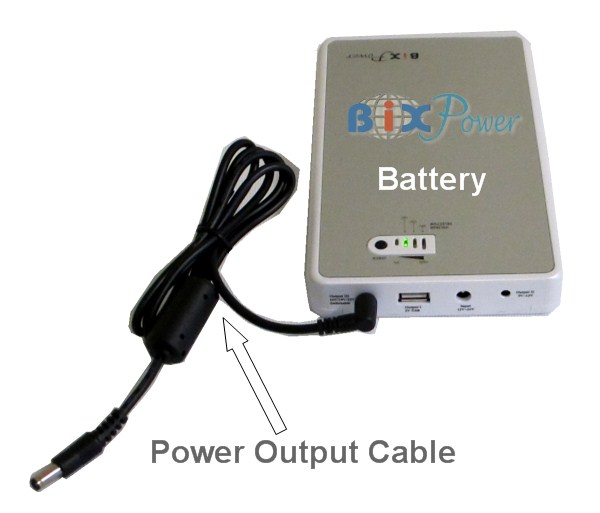
This battery can use same AC charger and connector tips as our BP150 and BP160 batteries. If you already have the AC charger and connector tips, you can just order the bare battery to save some money. However, if you do not have the AC charger and those connector tips, we recommend you ordering the battery together with the optional AC charger and connector tips so you can use the battery out of box immediately.
AC Charger is optional, not included in standard package.
Optional 10 Popular Connector Tips for Port III are not included in standard package. |