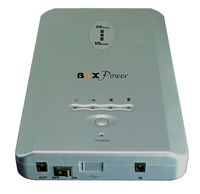
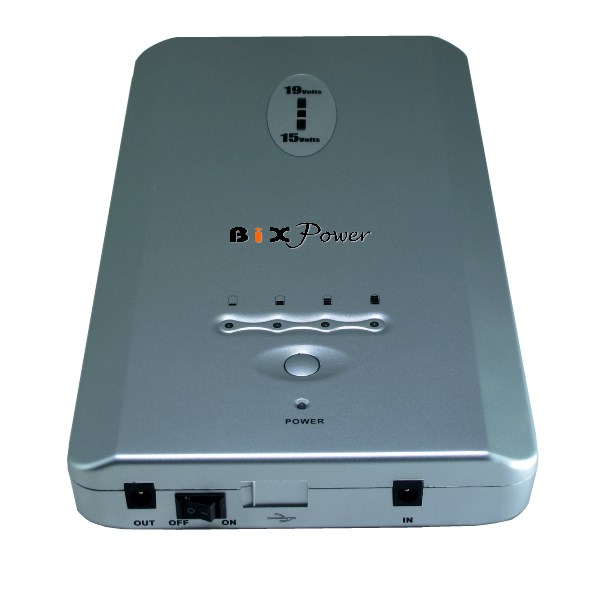
Super High-Capacity Universal External Battery Pack - BP170 This Universal External Lithium Rechargeable Battery Pack is the Solution for You if your notebook computers require 18V~20V DC input voltage (This voltage is your notebook AC power adapter output voltage, not the internal battery voltage.) !
Laptop Stand is available as an optional accessory.
Features:
It has up to 2~3 times battery run time (170 Watt-Hour, compared to 40~60 Watt-Hour for most notebook computer internal batteries.)
Its universal platform works for most laptop notebook
computers on the marketplace. One battery for many different notebook computers.
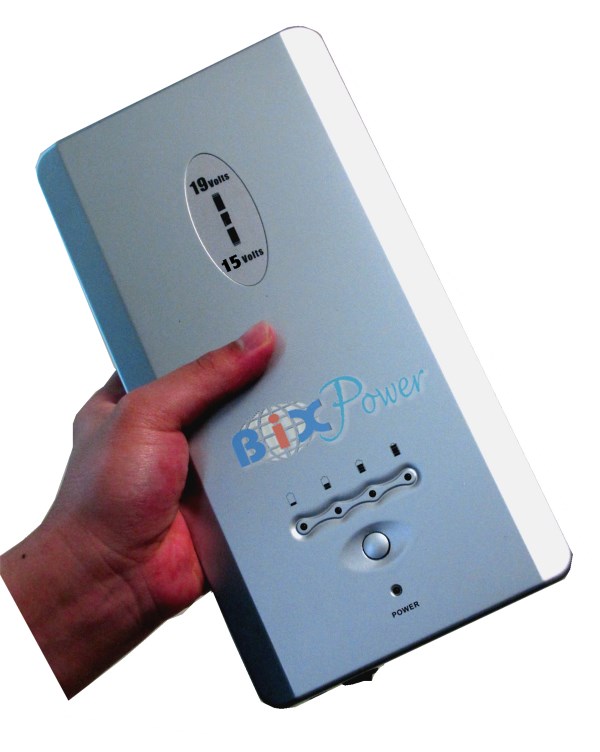
Its compact size can easily fit into a laptop/notebook carry bag or under a laptop stand .
Laptop bag and computer not included.
This Universal External Battery is designed to give the mobile computer user extra run time. You no longer have to worry about limited battery capacity for your mobile devices. This external battery combines a high capacity 171 Watt Hours rechargeable Lithium-Polymer battery and a modular design. With 12 modular connectors available, it is possible for powering most of notebook computers on market.
**Tech. Note**:
1. This battery has a 19V output voltage port. An external battery works differently from an internal battery. The output voltage of an external battery should close to your device AC/DC power adapter output voltage, not your internal battery output voltage. For example, no matter what is your laptop internal battery output voltage, if the AC power adapter output voltage is 18V~20V, you can use this battery. If the AC power adapter output voltage is 15~16V, then you can not use this external battery, you may need to use our SP75 or BP160 battery.
2. Don't mess a battery's capacity with its output power rate. This battery's capacity is about 170 Wh (Watt-hour), but its regular output power is about 90W (Watt). Capacity and output are two different concepts. Capacity tells you how long a battery can last under a full charge cycle, output power tells you how many watts power it can supply at any time. This battery is recommended for using with devices that need 90W or less power. If your device AC power adapter output rating is bigger than 90W, this battery may not work for you. This battery has over current protection. The maximum current output is 6A. When your devices try to draw more than 6A current, the battery will shut off for safety. After shut off, you need to use the AC charger to re-start the battery.
Comparisons of External Battery and Internal Battery
| |
External Battery
|
Traditional Internal Battery
|
| Battery Capacity |
170 Watt-Hour |
A typical 6-cell internal notebook battery capacity is about 48 Watt-Hour |
| How to Charge battery |
Has its own charger , battery can be charged anytime without the laptop/notebook computer. Very convenient |
Must put battery into laptop/notebook computer or use expensive proprietary charger to charge battery |
| How to use battery |
Plug to the laptop/notebook computer's DC power input plug, plug and play. |
Insert the battery into the laptop/notebook computer's battery bay. |
| Compatibility |
Can be used for 90% of laptop/notebook computers on the market. When you upgrade your laptop/notebook computer, you may still be able to use the battery for new laptop/notebook computer. |
Every internal battery is proprietary. Different laptop/notebook computer needs different battery. |
| Other usage |
Can provide 19V DC power & 5V USB Port power for other electronic devices also. |
can only be used for designed laptop/notebook computers. |
Features/Specifications:
(1) Powerful, 170 Watt-hours extensive power supply with long operating time.
(2) 3 Outputs: 19V, 12V, 5V. Wide compatibility, widely applied to laptop computers, Portable DVD, PDA and other devices.
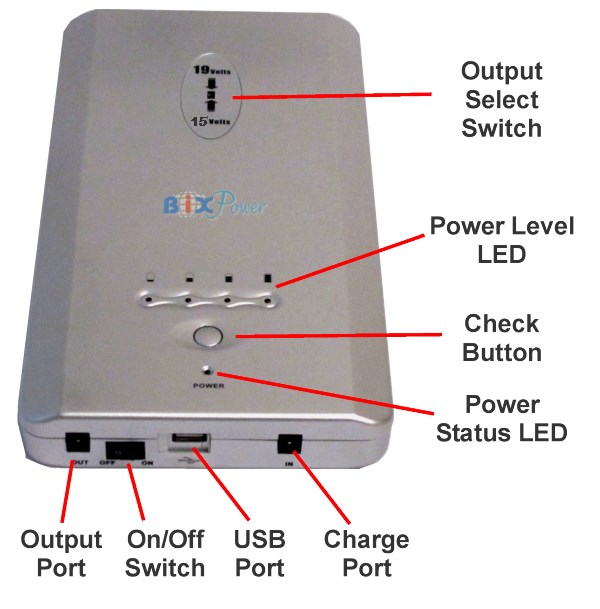
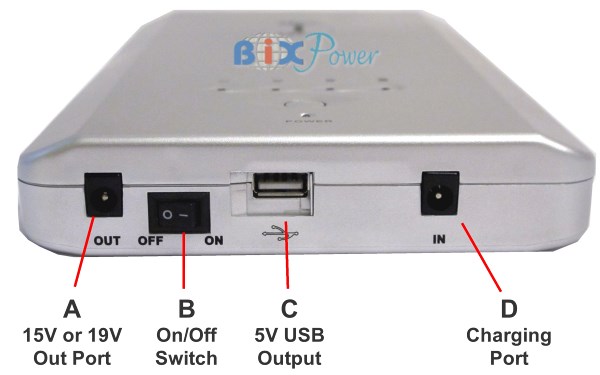
Note: Do not use three output ports at same time; Do not use two or more than two ports when the battery is under charge status.
Current output:
..19V port: 0~6A
..12V port: 0~2A
..USB Port: 0~1A
(3) 12 different tips included that work with over 10,000 notebook models including IBM, DELL, Sony, Apple, Compaq, Acer, Canon, Toshiba and etc.
(4) Chemistry: Advanced Lithium-Polymer Based
(5) Super High Capacity :9000 mAH @ 19V
(6) Super thin design: 11.5" x 8.5" X 0.75"
(7) Portable and convenient. Weight: 3.1 lb.
(8) Excellent security and reliability
(9) High efficiency power conversion
(10) Power saving function
(11) Memory effect free
(12) Environmentally friendly and economically efficient
How does this battery work:
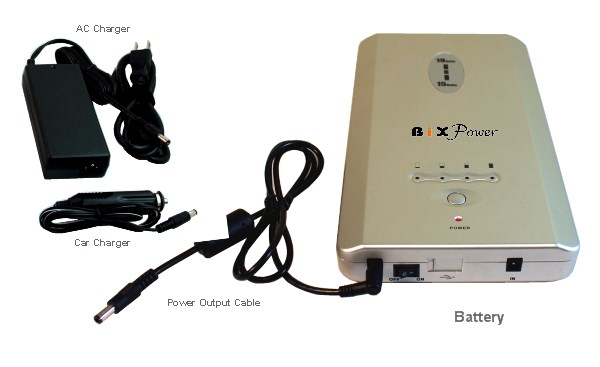
1. This battery has it own battery charger, you can charge it from any 110V or 220V AC power source with the included AC charger.
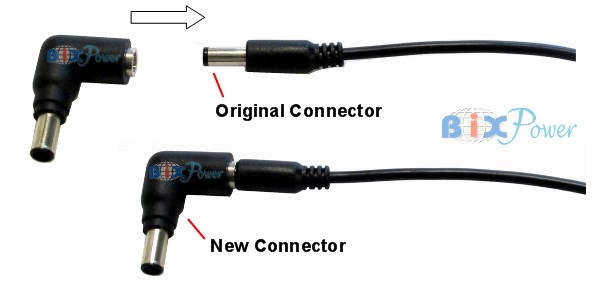
2. Select the right connector tip: Included with the battery pack are 12-plug tips that work with most notebooks & other devices. With the plug tip not connected to the output cord, locate the correct tip by fitting the tip into the notebook DC Jack. The tip should fit snugly in the DC jack
Connector Tips Included with the Battery Pack:
(Click on each tip image to see details for this tip)
* We may discontinue some old tips and add some new tips according to the market without notice. Actual connector tips come with the battery may not be exactly same as the pictures show.
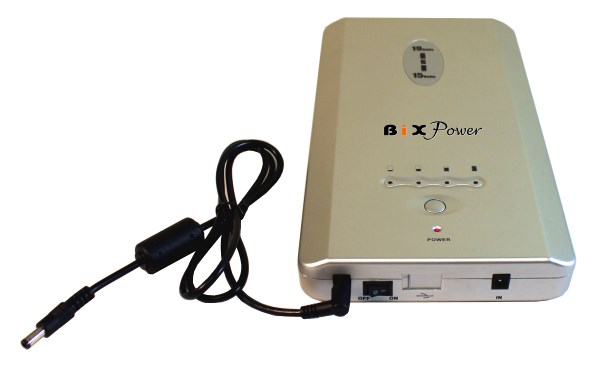
After you have selected the proper plug tip, connect the plug tip to the battery cord.
3. This battery has 3 output ports: 19V, 12V, 5V. After connect the connector tip to the battery output cord, select the output port, connect the output cord to the correct output port. The 19V output port is compatible with devices require 18V~20V DC.
Note: Do not use three output ports at same time; Do not use two or more than two ports when the battery is under charge status.
4. Connect the External Battery Pack to your notebook DC power input jack (which is the same jack your notebook AC power adapter usually plugs into). Now you can power your notebook from this External Battery Pack .
Note: If your notebook internal battery is a working battery and has been fully charged, you can leave it in your notebook. Otherwise, we recommend you removing the internal battery from your notebook to maximize the external battery running time. The external battery will still work fine if you leave non-charged internal battery in the notebook, but it may not reach the maximum running time since it needs to charge the internal battery at same time when it is powering the computer.
CAUTION: Always turn off the battery when you do not use the battery. There is an on/off switch on the back of the battery, please switch to �off?when you don�t use the battery. Leave the battery switch �on?may build up static inside the battery cells and damage the battery.
How long can this external battery run ?
This battery's capacity is 170Wh(Watt-hour): you can compare this battery's capacity with your internal battery capacity to figure out how long this battery can run your notebook. For example, if your notebook internal battery output is: 10.8V & 4000 mAh, then, your notebook internal battery capacity is:
10.8V x 4000 mAh = 43200 mVAh= 43.2 Wh (Watt-hour).
This external battery capacity is about 171/43.2=3.9 times of your internal battery capacity.
If your internal notebook battery can run 3 hours, then the external battery pack can theoretically run about : 3 hours x 3.9 = 11.7 hours.
This is a rough estimate. Actual running time varies, depending on notebook computer's configurations and what kind of applications running . For example, screen brightness, the use of the CPU, the hard drive, the CD drive, and other peripherals results in an additional drain upon the battery, effectively reducing the battery's run-time. The total run-time of the battery is also heavily dependent upon the design of the notebook. To ensure maximum performance of the battery, optimize the computer's power management features. Refer to the computer manual for further instructions.
Standard Accessories:
1.) AC charger
2.) 12 connectors
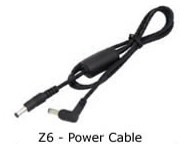
3.) Output Cord
4.) User Manual
Polarity
The default battery output cable and connectors are configured as positive polarity, which meet the needs of most of devices.
Partial Compatibility List:
Acer Aspire Series:
Acer Aspire 1200 Series, Aspire 1200X, Aspire 1200XV, Aspire 1202, Aspire 1202X, Aspire 1203X, Aspire 1203XC, Aspire 1203XV
Acer Aspire 1300, Aspire 1350, Aspire 1450, Aspire 1360 Aspire 1360 Series
Acer Aspire 1410 Aspire 1410 Series
Acer Aspire 1520 Series,
Acer Aspire 1640 Series Aspire 1640, Aspire 1640Z Aspire 1650 Series Aspire 1650Z Aspire 1660 Series, Aspire 1670 Series, Aspire 1680 Aspire 1680 Series Aspire 1690 Series Aspire 1690, Aspire 1690-II
Acer Aspire 2000 Series Aspire 2010 Series Aspire 2010, Aspire 2012WLCi Aspire 2020 Aspire 2020 Series
Acer Aspire 2420, Aspire 2920,
Acer Aspire 3000 Series, Aspire 3010 Series, Aspire 3020 Series, Aspire 3030 Series, Aspire 3050 Series, Aspire 3100 Series,
Acer Aspire 3500 Series, Aspire 3600 Series, Aspire 3610 Series, Aspire 3620 Series, Aspire 3628AWXCi
Acer Aspire 4220, Aspire 4310, Aspire 4315, Aspire 4320, Aspire 4520, Aspire 4710, Aspire 4710Z, Aspire 4720, Aspire 4920, Aspire 4920G,
Acer Aspire 5000 Series, Aspire 5010 Series, Aspire 5020 Series, Aspire 5030 Series, Aspire 5050 Series, Aspire 5100 Series
Acer Aspire 5310, Aspire 5315,
Acer Aspire 5500 Series, Aspire 5500Z, Aspire 5520, Aspire 5570Z, Aspire 5690, Aspire 5570 Series, Aspire 5580 Series,
Acer Aspire 5610 Series, Aspire 5630 Series, Aspire 5670 Series, Aspire 5672, Aspire 5680 Series
Acer Aspire 5710, Aspire 5710Z, Aspire 5715Z, Aspire 5720,
Acer Aspire 5920, Aspire 5920G,
Acer Aspire 7100 Series, Aspire 7520, Aspire 7720
Acer Aspire 9100 Series, Aspire 9300 Series, Aspire 9400 Series, Aspire 9410 Series, Aspire 9412WSMi, Aspire 9500 Series, Aspire 9800 Series, Aspire 9810 Series, Aspire 9815WKMi, Aspire 9920G,
Acer Extensa Series:
Acer Extensa 2000 Series, Extensa 2001LC, Extensa 2001LM Extensa 355, Extensa 390 Series Extensa 391, Extensa 391C, Extensa 391T, Extensa 392, Extensa 392C, Extensa 392T, Extensa 393, Extensa 393C, Extensa 393T, Extensa 394, Extensa 394T, Extensa 395, Extensa 500 Series Extensa 515, Extensa 600 Series Extensa 610, Extensa 616, Extensa 620, Extensa 690 Extensa 700 Series Extensa 900,
Acer Ferrari Series:
Acer Ferrari 1000 Series, Ferrari 3000 Series, Ferrari 3200 Series, Ferrari 3400 Series, Ferrari 4000 Series, Ferrari 5000 Series
Acer TraceMate Series:
Acer TravelMate 200 Series, TravelMate 210
Acer TravelMate 230,TravelMate 280,
Acer TravelMate 290 Series, TravelMate 290ATI, TravelMate 290E, TravelMate 292LMi
Acer TravelMate 340 Series, TravelMate 340T, TravelMate 341TV, TravelMate 342T, TravelMate 343TV
Acer TravelMate 360 Series, TravelMate 365
Acer TravelMate 505 Series, TravelMate 506 Series, TravelMate 507 Series, TravelMate 508 Series, TravelMate 510, TravelMate 512DX, TravelMate 512T TravelMate 514TVX, TravelMate 520, TravelMate 520iT, TravelMate 521, TravelMate 521TE, TravelMate 521TEV, TravelMate 521TXV, TravelMate 524, TravelMate 524TE, TravelMate 524TXV, TravelMate 525, TravelMate 525TX, TravelMate 525TXV, TravelMate 527, TravelMate 527TXV, TravelMate 529, TravelMate 529ATXV, TravelMate 529TXV
Acer TravelMate 660 Series TravelMate 662LVi
Acer TravelMate 2100 Series, TravelMate 2200 Series,
TravelMate 2300 Series, TravelMate 2301, TravelMate 2302, TravelMate 2303, TravelMate 2310 Series, TravelMate 2350 Series, TravelMate 2352, TravelMate 2353
Acer TravelMate 2400 Series, TravelMate 2410 Series, TravelMate 2420 Series, TravelMate 2430 Series, TravelMate 2440 Series, TravelMate 2450 Series, TravelMate 2480 Series
Acer TravelMate 2600 Series, TravelMate 2700 Series
Acer TravelMate 3000 Series, TravelMate 3010 Series, TravelMate 3200 Series, TravelMate 3220 Series, TravelMate 32603260 Series, TravelMate 3270 Series, TravelMate 3273WXMi
Acer TravelMate 3500,
Acer TravelMate 4000 Series, TravelMate 4000M, TravelMate 4001, TravelMate 4001LMi, TravelMate 4002 TravelMate 4050 Series, TravelMate 4051, TravelMate 4052, TravelMate 4053, TravelMate 4060 Series, TravelMate 4070 Series,
Acer TravelMate 4100 Series, TravelMate 4100-II
Acer TravelMate 4200 Series TravelMate 4200, TravelMate 4200WLMi, TravelMate 4202, TravelMate 4202WLMi, TravelMate 4220 Series, TravelMate 4230 Series,
Acer TravelMate 4310, TravelMate 4320,
Acer TravelMate 4500 Series, TravelMate 4520, ,
Acer TravelMate 4600 Series, TravelMate 4600-II, TravelMate 4650 Series, TravelMate 4670 Series, TravelMate 4720
Acer TravelMate 5100 Series, TravelMate 5210, TravelMate 5220, TravelMate 5310, TravelMate 5320, TravelMate 5400M, TravelMate 5510, TravelMate 5520, TravelMate 5600 TravelMate 5600 Series TravelMate 5672WLMi, TravelMate 5710, TravelMate 5720,
Acer TravelMate 6231, TravelMate 6291, TravelMate 6292, TravelMate 6492, TravelMate 6592,TravelMate 6410 Series, TravelMate 6460 Series,
Acer TravelMate 7320, TravelMate 7520, TravelMate 7720,
Acer TravelMate 8100 Series, TravelMate 8100A, TravelMate 8200 Series, TravelMate 8204, TravelMate 8210 Series
Acer TravelMate Tablets C100 Series, TravelMate C110 Series, TravelMate Tablets C200 Series, TravelMate C204TMi, TravelMate Tablets C300 Series, TravelMate C300XCi, TravelMate Tablets C310
AMI FT6T20, TF6760
ASUS Laptops:
Asus A Series,
Asus A2 Series, A2C, A2Lp, A2000H, A2000L,
Asus A3 Series, A3Ac, A3E, A3H, A3Vp,
Asus A6 Series, Asus A6, A6JA, A6JC, A6Jm, A6K,A6KM, A6KT, A6M, A6R, A6T, A6Ta, A6Tc, A6U, A6V, A6VA, A6Vc, A6VM
Asus A7 Series, Asus A7C, A7F, A7G, A7J, A7JC, A7M, A7S, A7Tc
Asus A8 Series, A8F, A8Jp, A8Jr, A8Js, A8M, A8Jm, A8Sc
Asus F Series, Asus F2J, F2Je, F3 Series, F3Ja, F3Jc, F3Jm, F3Jp, F3Jr,F5R, F9F, F9J, Asus F7000,
Asus G Series, Asus G1, G1S, G2, G2S
Asus Grandio F7400,
Asus L Series, L3 Series, L3000C, L3000H, L 5 Series, L5000GM, L7000, L7000C, L7200, L7300, L8400
Asus M Series, M2 Series, M2N, M2000, M2000N, M3 Series, M3000, M3000N, M5 Series, M5A, M5N, M5000, M5000NP, M6 Series, M6N, M6V, M6VA, M6000N, M6B00N, M6700N,
Asus R1E,
Asus S1 Series, S1N, S1000N, Asus S5 Series, S5N, S5Ne, Asus S5200N, Asus S6F,
Asus U Series, Asus U1F, U5A, U5F, U6E
Asus V Series, Asus V1J, V1Jp, V2Je, V6J, V6V, V6VA, V6Va, VX2
Asus V6 Series
Asus W Series, Asus W1, W1Jc, W1V, W2J, W2Pc, W2V, W3J, W3N, W3V, W3000, W5A, W5Ae, W5F, W5V, W6A, W7J
Asus X51R,
Asus Z Series, Asus Z3A, Z33A, Z35L, Z61A, Z63A, Z70A, Z71A, Z71V, Z83V, Z9 Series, Z9000, Z91E, Z93E
AVERATEC:
Averatec 3000, Averatec 3120, Averatec 3120V,
Averatec 3150 Series, Averatec 3150H, 3150Hd, 3150Hs, 3150P, Averatec 3150HW
Averatec 5110 Series, Averatec 5110H, 5110Hx, 5110P
Averatec 6200 Series, Averatec 6240, Averatec AV6200H60, Averatec AV6240
Compal
Compal ACY13, Compal APL10, Compal APL11, Compal BCL32, Compal BCQ12, Compal CL32, Compal CQ12, Compal CY13, Compal PL10, Compal PL11, Compal TS30H
Compaq
Compaq Armada 100, 110S, 600, 1120, 1120T, 1125, 1130, 1130T, 1135,3000, E500, M300, M700, V300 Series
Compaq Evo 3100, 5100, 5500, M5500, N110, N115, N150, N160, N200, N400, N600, N610, N620,N800, N1000, N1050, Series,
Compaq Evo tablet TC1000, TC1100
Compaq Presario 700, 800, 900, 1000, 1200, 12XL, 1400, 1500, 1510, 1520, 1530, 1540, 1600, 1700, 17XL, 1800, 1800T, 18XL,
Compaq Presario 2100, 2200, 2500, 2700, 2800, 3000 Series
Compaq Presario A900, B1000, B1800, B2000, B2800,
Compaq Presario C300, C500, C700,
Compaq Presario CQ20,CQ40, CQ45, CQ50, CQ55, CQ60
Compaq Presario F500, F700 Series
Compaq Presario M2000, M2100, M2200, M2300, M2400, M2500 Series
Compaq Presario R3000 Series
Compaq Presario V1000, V2000, V3000, V4000, V5000, V6000 Series
Compaq Presario X1000, X1100, X1200, X1300, X1400
Compaq Prosignia 160, 170, 190 Series
* This battery does NOT work for Compaq Presario R4000, Presario X6000
CompuSmart SmartLine CSL44, CSL46, CSL47, CSL58, CSL61
Dell
Dell Inspiron 11, 12, 13, 14, 15, 17
Dell Inspiron 1000, 1110, 1200, 1300, 1318, 1320, 1370,
Dell Inspiron 1410, 1420, 1425, 1427, 1428, 1440, 1464, 1470,
Dell Inspiron 1501, 1520, 1521, 1526, 1545, 1546, 1564, 1570
Dell Inspiron 1720, 1721, 1750, 1764
Dell Inspiron 2200, 3000, 3200, 3500, 7000, 7500,
Dell Inspiron B120, B130, 110L
Dell Inspiron 300m, 500m, 505m, 600m, 630m, 640m, 700m, 710m,
Dell Inspiron 6000, 6400, 8500, 8600, 9200, 9300, 9400,
Dell Inspiron E1405, E1505, E1705
Dell Inspiron M101Z, M5010, M5030
Dell Inspiron Mini 9 (910), Mini 10 (1010, 1011, 1012), Mini 12 (1210)
Dell Inspiron N4020, N4030, N5010, N5030, N7010
Dell Latitude C Series: C400, C500, C510, C540, C600, C610, C640, C800, C810, C840
Dell Latitude D Series: D400, D410, D420, D500, D505, D510, D520, D530, D531,
Dell Latitude D Series: D600, D610, D620, D630, D631, D800, D810, D820, D830
Dell Latitude E Series: E4200, E4300, E4310, E5400, E5410, E5500, E5510, E6400, E6410, E6500, E6510
Dell Latitude X300, X1, 131L
Dell Studio Series: Studio 1435, 1440, 1450, 1457, 1458, 1535, 1536, 1537, 1555, 1557, 1558, 1569
Dell Studio Series: Studio 1735, 1737, 1745, 1747, 1749
Dell Studio XPS Series: 1340, 1640, 1645, 1647
Dell Vostro Series: Vostro 1000, 1014, 1015, 1088, 1200, 1220, 1310, 1320, 1400
Dell Vostro Series: Vostro 1500, 1510, 1520, 1710, 1720,
Dell Vostro Series: Vostro 2510, 3300, 3400, 3500, 3700
Dell Vostro A840, A860, A90, V13
Dell XPS Series M1210, M140
Dell D-Series Docking Series: Station or D/Port Replicator
E-Machinee
eMachines M2105, M5309, M5310, M5312,
eMachines M6410, M6412, M6805, M6807, M6809
eMachines Action Note 800, Action Note 866, Action Note 880, Action Note 890, Action Note 895,
eMachines Action Note 900, Action Note 910,
eMachines eSlate 400, eSlate 450
Fujitsu:
This battery only works for Fujitsu laptops that requires 19V (18V ~ 20V) power. If your Fujitsu laptop power adapter output voltage is 16V, you can not use this battery.
Gateway:
Gateway 200 Series, 200ARC,
Gateway 400 Series, 400SD4, 400VTX, 450ROG, 450ROG, 450SX4,
Gateway 600 Series, 600YG2, 600YGR,
Geateway Tablet PC M1200, Tablet PC M1300
Gateway 3000 Series: 3018GZ, 3040GZ, 3522GZ, 3545GZ, 3550GH, 3550GZ, 3610GZ
Gateway 6000 Series: 6010GZ, 6018GH, 6018GZ, 6020GZ, 6021GH, 6021GZ, 6022GZ, 6023GP, 6510GZ,6518GZ, 6520GZ, 6525GP, 6531GZ
Gateway 7110GX, 7508GX, 7510GX, 8510GH, 8510GZ, CX2615, CX2618, Retail 7000, S-7200N, S-7500N,
Gateway M Series: M250, M250A, M250B, M250E, M275R, M250ES, M250G, M250GS, M275, M305, M305CRV, M405, M500, M505, M520
Gateway MX Series: MX3042, MX3044, MX3044h, MX3210, MX3215, MX3558, MX3558h, MX3560, MX3560h, MX3562, MX3563, MX3563h, MX3610, MX6025, MX6025h, MX6027, MX6027h, MX6028, MX6030, MX6124, MX6124h, MX6128, MX6135, MX6420, MX6421, MX6423, MX6424, MX6425, MX6428, MX6450, MX6625, MX6627, MX6627h, MX6629, MX6629h, MX6631, MX6650, MX6650h, MX7118MX7515, MX7515h, MX7525, MX8520, MX8523, MX8525, MX8528
Gateway NX Series: NX200S, NX200X, NX250X, NX500S, NX500X, NX550X, NX550XL
Gateway Solo Series: Solo 1100, 1150, 1200, 1400, 1450, 2000, 2100, 2150, 2200, 2300, 2500, 2550, 3100, 3150, 5100, 5150,5300, 5350, 9100, 9300, 9500, 9550
HP
HP Pavilion dv4, dv5, dv7 series
HP Pavilion dv1000, dv1100, dv1200, dv1300, dv1400, dv1500, dv1600, dv1700,
HP Pavilion dv2000, dv4000, dv5000, dv6000, dv8000, dv9000 Series
HP Pavilion n3000, n5000 series
HP Pavilion tx1300, tx2100, tx2500
HP Pavilion ze1000, ze2000, ze2100, ze2200, ze4000, ze5000 Series
HP Pavilion zt1000, zt3000, zv5000 series
HP G5000, G6000, G7000 Series
HP COMPAQ
HP Compaq Business Notebook tc4400,
HP Compaq Mini-Note 2133
HP Compaq Presario B1200, B1210 Series
HP Compaq Business Notebook Series:
Business Notebook 2210b, 2510p, 2710p,
Business Notebook 6510b, 6515b, 6710b, 6710s, 6715b, 6715s, 6720S,
Business Notebook 6820S, 6910p,
Business Notebook 8510p, 8710p
HP Compaq Business Notebook nc Series:
Business NoteBook nc2400, nc2410,
Business Notebook nc4400, nc6140, nc6320, nc6400, nc8430
HP Compaq Business Notebook nx Series:
Business Notebook nx6115, nx6130, nx6310, nx6315, nx6320, nx6325,nx6330,
Business Notebook nx7300, nx7400, nx8410, nx9420, nx9600
HP Compaq Mobile Workstation Series:
Mobile Workstation 8510w, 8710w,
Mobile Workstation nw8440, nw9440,
Mobile Workstation nx8420
*Note: This battery does NOT work for HP Pavilion zd8000, HP Pavilion zv6000, HP Compaq nx9600 Series.
IBM/Lenovo: This battery only works for IBM/Lenovo laptops that requires 19V (18V ~ 20V) power. If your laptop power adapter output voltage is 16V, you can not use this battery.
IBM ThinkPad R60 R60, R60e, R60i, R61, R61e, R61i
IBM ThinkPad T60 T60, T60p, T61 T61p series
IBM ThinkPad X60 X60, X60s, X60 Tablet, X61, X61s, X61 Tablet
IBM ThinkPad Z60 Z60m, Z60t, Z61e, Z61m, Z61p, Z61t
Lenovo C100, C200
Lenovo N100, N200
Lenovo V100, V200
Lenovo 3000
IBM/Lenovo Thinkpad 3000 Series:
3000 Y100, Type 8825
3000 Y300, Type 7759
3000 Y500, Type 7761
IBM / Lenovo ThinkPad X200, Type 7454, 7455, 7457, 7458, 7459
IBM / Lenovo ThinkPad X300, Type 2748, 2749, 4052, 6476, 6477, 6478
IBM / Lenovo ThinkPad X301, Type 2774, 2776, 2777, 4057, 4182
ProStar:
Prostar 86, Prostar 982,
Prostar 2000 Series: Prostar 2100, 2100p, 2200C, 2200c, 2200S, 2200s, 2200T, 2200t, 2253, 2273, 2293, 2794
Prostar 3000 Series: Prostar 3100B, 3100b, 3100C, 3100c, 3150, 3550, 3593
Prostar 4000 Series: Prostar 4014, 4074, 4094, 4200, 4283, 4794
Prostar 5100S, 5190, 9870,
Prostar D Series: Prostar D270X, D400E, D400S, D410S, D470W
SAGER:
Sager 3500, Sager 5100C, Sager 5150, Sager 5200, Sager 6200, Sager 7200,Sager 8549 D20, Sager 86, Sager 862,Sager 87, Sager 8700, Sager 98 Series
Sager VM8000 Series, Sager VM8100 Series
Sager NB Series: Sager NB8600, NB8700,
Sager NP Series: Sager NP2720, NP2880, Sager NP3350I, NP3360V, NP3750, NP4020, Sager NP4060, NP4080, NP4760, NP4780, Sager NP4780-C, NP4780-S, NP4780-V, NP5680, NP8100, NP8300, NP8320, NP8500, NP8600, NP8620, NP8623, NP8700, NP8890
Sharp:
Sharp PC-A800, PC-S400
Sharp PC3000 Series: PC3010, PC3020, PC3030, PC3040, PC3050, PC3060, PC3070, PC3080, PC3150
Sharp PC8000 Series
Sharp PC9000 Series: PC9000, PC9010, PC9020, PC9030, PC9040, PC9050, PC9070, PC9080, PC9340,
Sony : this battery will work for Sony laptops with 19V AC power adapters. If your Sony laptop has a 16V AC power adapter, you need to use our BP150 battery.
Sony VAIO PCG Series
PCG-700, PCG-800, PCG-F, PCG-FR, PCG-FRV, PCG-FX, PCG-GRS, PCG-GRT, PCG-GRV, PCG-GRZ, PCG-NVR, PCG-R505, PCG-VX, PCG-XG,
Sony VAIO VGN Series:
VGN-A, VGN-AX, VGN-BX, VGN-FE, VGN-FJ, VGN-FS, VGN-S, VGN-SZ, ...
Toshiba: this battery will work for Toshiba laptops with 19V AC power adapters. If your Toshiba laptop has a 15V AC power adapter, you need to use our BP150 battery.
Toshiba Satellite 1000, 1005, 1100, 1200, 1600, 1605, 1620, 1625, 1640, 1670, 1675, 1690, 1695, 1700, 1715, 1730, 1735, 1750, 1755, 1900, 2430, 3000 Series
Toshiba Satellite A60, A65, A70, A75, A80, A85, A100, A105, A110 Series
Toshiba Satellite M30X, M35X, M40, M45, M55, M60, M65, M105, Series
Twinhead
Twinhead SlimNote 5, 9, 100, 550S, 575, 600D, 875TX, 890, 5100, 6100, 8100, 890 Series
Twinhead SlimNote 910CV, 9100 Series, SlimNote 9150TZ, SlimNote 9166TZ,
Twinhead SlimNote VX, SlimNote VXE, SlimNote VXE3
TTX Performance P2000
Winbook
Winbook C Series: Winbook C120, Winbook C140, Winbook C170
Winbook FX, Winbook J, Winbook J4, Winbook LM,
Winbook M201, Winbook M220, Winbook M221, Winbook M301, Winbook M351, Winbook M402,
Winbook N, N3, N4 Series Winbook Si,
Winbook X1, X4, XL, XLi, XL2, XL3, XP,XP5
Winbook Z, Z1
Winbook W Series: Winbook W140, Winbook W160
Above list is just a partial list. Please use our Laptop/Notebook Upgrade Guide to find right battery for you . If this battery is listed under your laptop, it means it will work for your laptop.
Even you can not find your laptop or other device listed in our web site, the battery may still work for you. If your device needs 18V ~ 20V DC power ( it is same as your device AC power adapter DC output voltage), the DC plug is round shape and looks similar to one of connector tips shows on the following picture, then this battery should work for your device.(Click on each tip image to see details for this tip)
* We may discontinue some old tips and add some new tips according to the market without notice. Actual connector tips come with the battery may not be exactly same as the pictures show.
If your laptop need 15V~16V DC input, such as some IBM , Fujitsu, Panasonic, Toshiba laptops, you can use our SP75 or BP150 battery.
Warranty: One Year limited warranty.
Warranty info: one year limited warranty covers manufacturing and quality defects! Please note that how long your battery's lifetime can last is depending on how you use it and how well you keep it and which is not a warranty issue. The life of a rechargeable battery operating under normal conditions is generally around 500 charge-discharge cycles. As the rechargeable battery has been used for a while, the user will notice a decline in the running time of the battery. This is normal and is not covered by warranty.
We ship this battery through UPS only. Not available to APO/FPO addresses. Overall Rating for Super High-Capacity Rechargeable External Battery Pack - BP170AIRLINE TRAVEL FAQ
WHAT KINDS OF BATTERIES ARE ALLOWED IN CARRY-ON BAGGAGE (in the aircraft cabin)?
Passengers can carry most consumer batteries and personal battery-powered devices. Spare batteries must be protected from damage and short circuit. Passengers can bring two (2) larger lithium ion batteries (more than 8 grams, up to 25 grams of equivalent lithium content per battery) in their carry-on. This size covers larger extended-life batteries such as the BP150 battery.
WHAT IS THE LITHIUM CONTENT (grams) PER BP170 PACK?
12.9g
WHAT KINDS OF BATTERIES ARE ALLOWED IN CHECKED BAGGAGE?
Spare lithium batteries are prohibited in checked baggage.
WHAT DOES "PROTECTED FROM SHORT CIRCUIT" MEAN?
Protected from short circuit means that a battery's terminals are protected from being touched by metal. When metal such as keys, coins, or other batteries come in contact with both terminals of a battery, it can create a circuit or path for electricity to flow through. This can cause extreme heat and sparks and even start a fire. To prevent short circuits, keep spare batteries in their original packaging, a battery case, or separate pouch or pocket.
ARE BP170 BATTERY PACKS PROTECTED FROM SHORT CIRCUIT ?
YES. BP170 Battery Packs are built within a protective aluminum alloy scratch resistant shell. Built in circuitry protection also protects against thermal run-away and overheating.
PLEASE NOTE: THIS IN INTENDED AS INFORMAL GUIDANCE MATERIAL ONLY. For further information, please go to http://SafeTravel.DOT.Gov
For TSA security restrictions, please go to http://www.tsa.gov
Laptop Stand is available as an optional accessory.
|